Panic button for elderly: what to look for when buying

Some images are AI generated
By: Bas | Last updated: 2 June 2026
In this article we run through the most important points for choosing a panic button for elderly parents.
Contents
- What is a panic button for elderly people?
- How does a panic button work?
- Pendant, wristband or watch?
- What should you look for when choosing?
- Who gets called: a monitoring centre or family?
- The voicemail problem
- How do you set up a panic button?
- Battery, charging and waterproofing
- What does an emergency button for seniors cost, and is there funding?
- Funding and contributions
- How do you get your father or mother to wear it?
- When a panic button is not a good choice
- Frequently asked questions
A little background. We are Eric and Bas, father and son. We started KUUS. after Eric's mother-in-law lay on the kitchen floor for two days. Her phone was on the worktop and she could not reach it. That is why we wrote this guide not as advertising, but as the explanation we would have liked to read ourselves.
A panic button for elderly people is a wearable button that lets your father or mother call for help with a single press. The button sits on a pendant, a wristband or a watch, and on an alarm it calls a pre-set contact person or a monitoring centre directly. Many models also send the GPS location, and some detect a fall automatically. What it comes down to when choosing: will the button actually be worn, who gets called, and are there running subscription costs attached?
What is a panic button for elderly people?
A panic button for elderly people, also called an SOS button or a personal alarm, is a small device your father or mother carries. One press of the button calls for help. The button comes in three forms: as a pendant around the neck, as a wristband on the wrist, or built into an alarm watch. The aim is simple: after a fall, a moment of feeling unwell or an unsafe feeling, to reach someone quickly without having to look for a phone first. Because that is exactly what goes wrong. The phone is in the other room, on the worktop, or in a bag. A button you always wear is never too far away.
How does a panic button work?
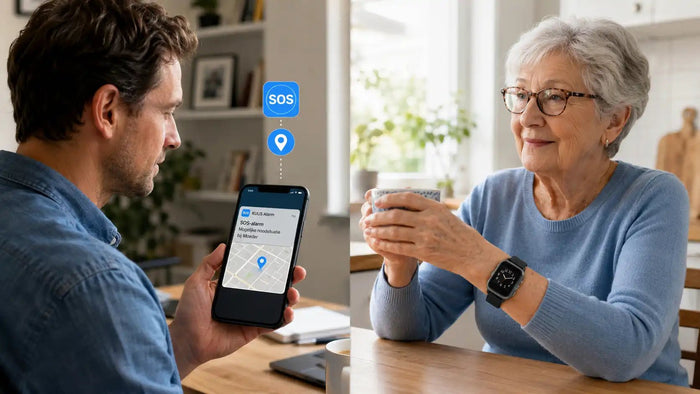
At its core, a modern panic button works like a mini phone. There is a SIM card inside the device, so it can call on its own, outdoors as well. No smartphone needed from the wearer. Behind the scenes, this is what happens:
- Your parent holds the button down for a few seconds (or the device detects a fall by itself).
- The device calls the first contact on the list. If there is no answer it automatically moves on to the next number.
- Through the built-in microphone and speaker your parent can talk straight away, without having to pick up a phone.
- In the app on your phone you can see the GPS location on a map.
Older systems still work with a fixed base station in the house, plugged into a socket and the landline. Those only work indoors. A panic button with its own SIM card works anywhere: in the garden, in the street, at the supermarket.
Pendant, wristband or watch?
The form matters more than most people think. A panic button that looks like a panic button, too visibly medical, often stays in the drawer. And a button in a drawer is a bill, not safety. An alarm watch for the elderly does get worn, because it looks like an ordinary watch.
- Pendant around the neck. Familiar and simple. Downside: some older people take it off to sleep or shower, exactly at the risky moments.
- Wristband. Sits on the wrist and comes off less often. Good for anyone who does not want a necklace.
- Alarm watch. Our preference for most people. It looks like an ordinary watch, so it gets worn, and it simply shows the time.
That is our core view in one line: form decides whether it gets worn, and whether it gets worn decides whether it works. A technically perfect button that is not on the wrist or around the neck helps nobody.
What should you look for when choosing?
Seven points, in order of importance.
- Will it be worn? The way it looks is the most important thing, and it is discussed the least.
- Does it work without a smartphone? Choose a model with its own SIM card, not one that depends on a charged phone being nearby.
- Does it have GPS? Not crucial indoors, but it is outdoors. Important if your parent could get lost.
- Does it have fall detection? Useful if your parent cannot reach the button themselves after a fall.
- Is it waterproof? Anyone who takes the button off to shower also forgets to put it back on. A fall in the bathroom is a classic.
- Who gets called? Family or a monitoring centre?
- Is there a subscription? Work out the cost over five to ten years before you choose.
Who gets called: a monitoring centre or family?
This is where the biggest difference between suppliers sits. Two models.
Monitoring centre. The button calls a professional centre. An operator asks what has happened, looks up the address and arranges the right help. This comes as standard behind a running monthly subscription.
Straight to family. The button calls the contacts you have set directly: you, a brother or sister, a neighbour. Whoever answers first has your parent on the line immediately. No step in between, no subscription. That is how KUUS. works.
For most situations, calling family directly is faster and more human. Honest the other way round: if the whole family lives far away or nobody is reachable during the day, a monitoring centre is a good addition.
The voicemail problem
A point that is rarely discussed but matters: what happens if the button calls family and nobody picks up? On a poor system the call goes to voicemail and the alarm is lost. So check that the device works through a list of contacts automatically until someone answers, and that it recognises when it has reached a voicemail and moves on to the next number. Set at least three contacts. One contact person is not a safety net, that is a gamble.
How do you set up a panic button?
Setting up a panic button is not a technical job, but do it together, and do not leave your parent alone with the manual. Broadly:
- Insert the SIM card and charge the device fully.
- Install the matching app on your own phone as the family member.
- Add the contact people in the right order: whoever should be called first goes at the top.
- Where possible, set up fall detection and a safe zone (geofencing).
- Test the alarm once for real. Press the button, let it ring, answer it. Then you know it works before it is needed.
Most people skip that last point, and an emergency is exactly the wrong moment to find out that a number is wrong. One test round every six months is enough.
Battery, charging and waterproofing
Three practical points decide whether a panic button is reliable in daily use.
- Battery life. Two to five days is normal. The less often it needs charging, the smaller the chance that the device is sitting flat in a drawer at the moment it is needed.
- Charging. A magnetic charger that clicks on easily works better than a small cap that has to line up exactly. Tie charging to a fixed moment, for example during breakfast.
- Waterproof. The bathroom is a classic place to fall. A button that has to come off before showering often gets forgotten afterwards. Choose at least shower-proof; IP67 or higher is a good lower limit.
- Coverage and network. Choose a device that works over 4G, not over outdated 2G. 4G has better coverage indoors and will keep working in the coming years, while operators are switching off the old 2G networks step by step.
A panic button that only works within a few metres of a base station limits your parent to one room. With its own 4G SIM card the alarm works throughout the house, in the garden and beyond.
What does an emergency button for seniors cost, and is there funding?
Buying a panic button costs roughly between €85 and €250, depending on the form and the features. On top of that there are two models:
- With a subscription: €20 to €35 a month for the SIM card and the monitoring centre, for as long as it is worn. Over five to ten years that quickly adds up to €1,200 to €4,200.
- No subscription: you buy the device once and choose your own prepaid SIM card from around €1 a month in data. No running contract.
As far as we are concerned, safety for your father or mother should not be a subscription product. A button that in 95% of cases is never pressed should not be a monthly cost for years.
Funding and contributions
A personal alarm is sometimes partly funded. Whether there is any funding or a contribution depends on your insurance and on the rules where you live. In some cases there is support on medical grounds, or where living independently would otherwise be at risk. Check your policy conditions and ask locally, because the rules differ.
How do you get your father or mother to wear it?
The biggest hurdle is rarely the technology, but the willingness to wear it. Many older people respond with "I don't need it". What helps:
- Do not sell it as an alarm, but as convenience. A watch that shows the time and lets you make calls is something different from a medical button. People are happy to wear the first one.
- Make it about you. "I worry when you don't answer. With this button I know you can just press it if something happens." For your parent it is a button, for you it is peace of mind.
- Start small. Let your parent get used to wearing and charging it for a week before you demonstrate the SOS function.
- Give it on an occasion. Around a birthday or the holidays it feels like a gift, not like an intervention.
When a panic button is not a good choice
You rarely read this on a product page, but it belongs here.
- If there is always a healthy partner at home. Then a panic button solves a problem that is not there.
- With advanced dementia. Someone who takes the button off, loses it or finds it strange will not wear it reliably. Look at a different solution then, for example a GPS tracker for dementia.
- Where there is a principled objection to technology on the body. Then every purchase becomes a matter of persuasion, and that is a battle you lose more often than you win.
Better an honest no than a purchase you regret.
Frequently asked questions
Answers to the questions we get most often.
What does a panic button for elderly people cost?
The purchase costs roughly between €85 and €250, depending on form and features. On top of that, either a monthly subscription of €20 to €35 (including a monitoring centre), or a prepaid SIM card from around €1 a month on models without a subscription.
Is a panic button covered by insurance?
Sometimes. Whether there is partial funding or a contribution depends on your insurance and on the rules where you live. The conditions differ, so check your policy and ask locally.
How does an emergency button for seniors work?
You hold the button down for a few seconds. The device then automatically calls a pre-set contact person or a monitoring centre, and you can talk straight away through the built-in speaker. On models with GPS the location is sent along as well.
Which panic button suits your situation?
The right panic button is the one your parent actually wears. An alarm watch that looks like an ordinary watch gets worn more often than a visibly medical pendant. After that, look at GPS, fall detection, waterproofing and whether a subscription is attached.
Does a panic button need a subscription?
No. There are models without a subscription, where you choose your own prepaid SIM card. A subscription is only needed if you want a professional monitoring centre service.
Does a panic button work outside the house too?
Yes, provided the device has its own SIM card and GPS. Old systems with a fixed base station only work indoors, within range of the station.
What is the difference between a panic button and an alarm watch?
An alarm watch is a form of panic button: the button sits in a watch instead of in a pendant or wristband. The big advantage is that a watch stands out less and is therefore worn more often.
How long does the battery of a panic button last?
On most modern panic buttons, two to five days on a full charge. Tie charging to a fixed moment in the day, so the device does not run flat at an unlucky moment.
Finally
A panic button is not a medical device and not a replacement for good care. It is a button with a safety net underneath. For your parent it is a small thing on the wrist or around the neck. For you it is the certainty that a fall does not end in hours on the floor.
Want to know which KUUS. model fits? Have a look at our alarm watches for the elderly, with no compulsory subscription, with an SOS button, fall detection and GPS.
About the author
Bas Lommen is co-founder of KUUS. Together with his father Eric he started the company after a family incident in which a loved one lay on the kitchen floor for two days before help arrived.