Wireless security camera: how to secure your home

Some images are AI generated
In today's world, securing your home is more important than ever. With the rise in burglaries and other security risks, it has become essential to take proactive measures to protect yourself, your loved ones and your belongings. Home security isn't just about deterring potential burglars, but also about creating a sense of safety and peace of mind for residents.
In this context, wireless security cameras have quickly become one of the most popular and effective solutions for home security. These mini security cameras not only let you monitor your home in real time, but they're also easy to install and use. What's more, thanks to advances in technology, these remarkably small cameras are now more accessible and affordable than ever, making them an obvious choice for many homeowners looking for reliable security solutions.
Benefits of a wireless security camera
One of the biggest benefits of a wireless security camera is how easy it is to install. Unlike traditional security cameras, which often require complex wiring and professional installation, wireless cameras can be set up easily without much technical knowledge. This means you can install them yourself without the help of an expert, saving both time and money.
Wireless cameras also offer unmatched flexibility when it comes to placement. They're not tied to power sockets or fixed wiring, so you can put them almost anywhere in and around your home. Whether you want to place one by the front door, in the back garden, or discreetly hidden for unobtrusive monitoring, the possibilities are virtually endless.
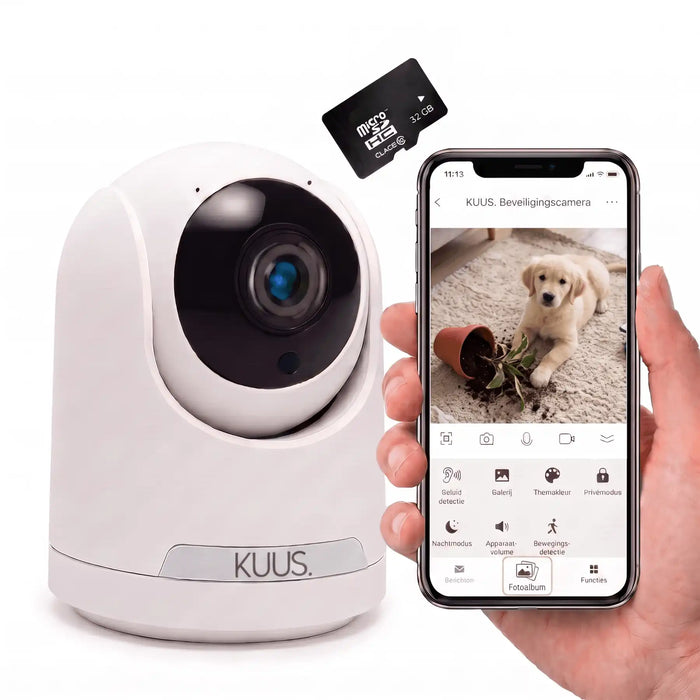
Finally, and perhaps most crucially, there's the ability to monitor your home remotely. With the C2 camera, you can view live footage in real time via your smartphone, tablet or computer, wherever you are. This means you can always keep an eye on things, even while on holiday or at work, and take immediate action if you spot suspicious activity.

How to choose the right small security camera
When choosing a small security camera for your home, there are several factors to consider. Between the KUUS. C1 and C2, each model has its own distinct features and benefits. The C1 camera is ideal for anyone who wants a camera without wifi. This can be especially useful in areas where the wifi connection is unstable or unavailable altogether. The C2 camera, on the other hand, offers the same features plus a range of more advanced ones. Want to view live footage, use an app for easy access and control, and enjoy a longer battery life and more storage? Then the C2 is probably the right choice for you. What's particularly notable is that the C2's extra features are available for just €25 more. This makes it an extremely cost-effective option for anyone looking for a small security camera with more extensive features without breaking the bank.
Installation tips for a wireless security camera
Installing a small security camera isn't just a matter of unboxing it and switching it on. There are a few crucial steps to follow to make sure your camera works effectively and your home is properly secured.
1. Choosing the right location
The location of your mini security camera is crucial. You want to choose a spot that offers a wide, unobstructed view of your property. Think of places like the front door, back garden, or windows that burglars might use to gain access. It's also important to make sure the camera is out of reach and protected from the weather if it's an outdoor camera.
2. Ensuring a stable wifi connection
If you want to view live footage, a wireless security camera is only as good as the wifi connection it's using. Make sure the camera is placed within range of your router, or consider using a wifi extender if the camera is far from the router. A stable connection ensures a clear video stream and minimises the risk of dropped connections.
3. Setting up notifications and alerts
One of the biggest benefits of modern wireless security cameras is the ability to receive real-time notifications when motion is detected or other suspicious activity occurs. Go into your camera's settings or its companion app and set up notifications to be sent to your smartphone, tablet or email. That way, you always know what's happening in and around your home, even when you're not there.
Invest in your safety
In a world where safety and peace of mind matter most, the KUUS. wireless security camera offers a reliable and effective solution. These mini security cameras are built with the latest technologies and features to help keep every home, whatever its size or location, safe and secure. Whether you want to view live footage, receive notifications about suspicious activity, or simply have peace of mind that your loved ones and belongings are protected, the KUUS. wireless security camera offers it all. Invest in your safety today and browse the cameras.